LearnUpon: Signing Up for a Course
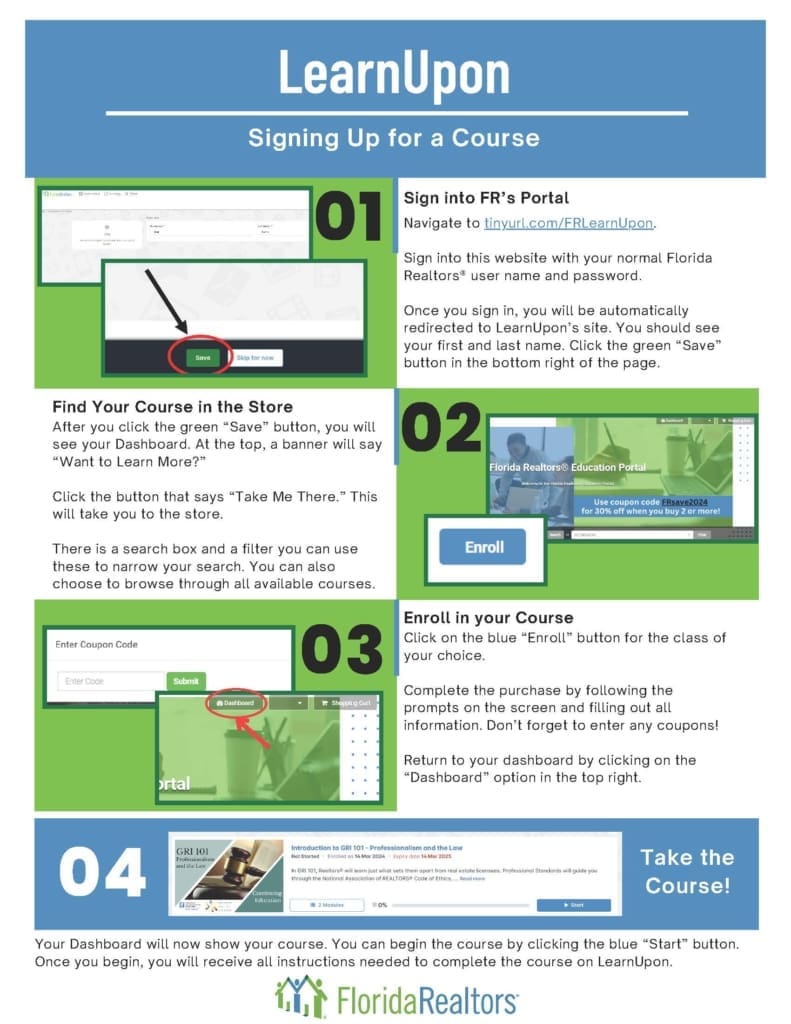
1. Sign into FR’s Portal
Navigate to tinyurl.com
Sign into this website with your normal Florida Realtors user name and password.
Once you sign in, you will be automatically redirected to LearnUpon’s site. You should see your first and last name. Click the green “Save” button in the bottom right of the page.
2. Find Your Course in the Store
After you click the green “Save” button, you will see your Dashboard. At the top, a banner will say “Want to Learn More?”.
Click the button that says “Take Me There.” This will take you to the store.
There is a search box and a filter you can use these to narrow your search. You can also choose to browse through all available courses.
3. Enroll in your Course
Click on the blue “Enroll” button for the class of your choice.
Complete the purchase by following the prompts on the screen and filling out all information. Don’t forget to enter any coupons!
Return to your dashboard by clicking on the “Dashboard” option in the top right.
4. Take the Course
Your Dashboard will now show your course. You can begin the course by clicking the blue “Start” button. Once you begin, you will receive all instructions needed to complete the course on LearnUpon.